Please reach us at enquiries@manorinthefields.com if you cannot find an answer to your question.
The key lock is positioned to the right hand side of the front door. The key lock number is provided in your welcome email. You will find 2 keys. The Yale is for the front door and the other is for the back door. To open the front turn the Yale key to the right and push open. There is a long key hanging on hooks right by the back door. This is for the garden gate on the side of the cottager to this item.
It is currently set on a timer with heating on in the morning and evening. Should you need to put the heating on for extra time there is an extra hour button that allows you to extend heating for a couple of hours and an override button that allows you to put heating on if currently timed off. The heating will stay on until the next programmed time. The heating controls can be found in the 2nd bedroom in the cupboard next to the water heater. The room thermostat that provides temperature control is on the top beam at the bottom of the stairs.
If you haven't used an AGA before we have provided an AGA bible cookbook which provides basic information on how to use the AGA. Essentially there is a roasting oven (top right) and simmering oven (below right) and the plates follow the same, one hot and one simmering. With the cooler weather we have the AGA set to 4/5 . The dial can be found on the front of the AGA to the left. Please DO NOT turn off. There are also some hob plates to the left of the AGA that can be used as well or instead of.
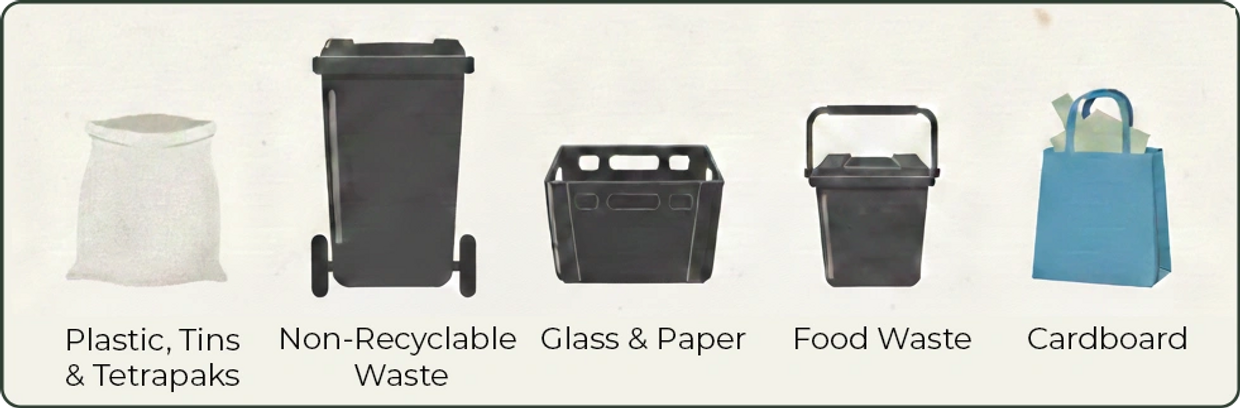
We leave them at the bottom of the garden. The big black bin is for non-recyclable and food waste, the small black container is for glass, the white bag is for plastics and cans and the blue bag is for cardboard.
REGISTER THE FIRE TV DEVICE
1. Turn on the TV and Fire TV device
Use the TV remote to select the correct HDMI input for the Fire TV Stick.
2. Connect to Wi-Fi
Follow the on-screen instructions to connect the Fire TV to the property’s Wi-Fi network if prompted.
3. Register with Your Amazon Account
On the registration screen, you’ll be asked to sign in with your Amazon account. You can register in three ways:
Using the remote: Enter your Amazon account email and password using the on-screen keyboard.
Using a web browser: Go to [amazon.com/code] on your phone or computer, sign in, and enter the code displayed on the TV.
Using a QR code: Scan the QR code on the TV screen with your phone’s camera and follow the prompts to sign in35.
Follow the on-screen instructions to complete registration.
4. Enjoy Streaming!
Once registered, you can install and use your favourite streaming apps.
DE-REGISTER THE FIRE TV DEVICE (Prior to Checkout)
1. Open Settings
Press the Home button on the Fire TV remote. Navigate to the Settings (gear icon) on the far right of the menu bar.
2. Go to Account & Profile Settings
Select Account & Profile Settings.
3. Select Amazon Account
Click on Amazon Account.
4. Deregister
Choose Deregister and confirm when prompted. This will remove your Amazon account and log you out of any Amazon-linked apps. Your installed apps will remain, but your personal information will not.
We use cookies to analyze website traffic and optimize your website experience. By accepting our use of cookies, your data will be aggregated with all other user data.